Batch method conditions
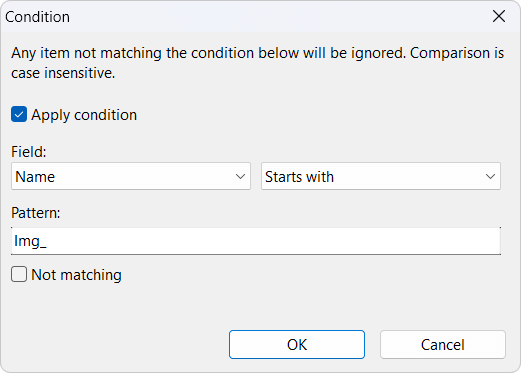 When a batch is configured with multiple methods, it might be necessary to limit the use of some methods for certain files. The batch method condition window can be used to configure a pattern for including or excluding certain files. Any subsequent methods will still be executed on all files. Each method can have its own condition configuration.
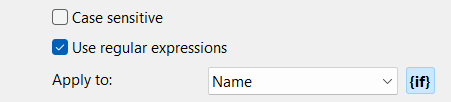
To activate batch method condition, click the {if} button next to the Apply To field.
This feature is not available for all methods. The following methods don't support batch method conditions: Timestamp, Script, List.
Field
Choose which field to use for pattern match. Can be set to:
| Name | The original filename without the extension part. |
| New name | The new filename of the file without the extension part. It is the new name the file has at the moment when the condition is evaluated. If multiple methods are used and the condition is applied to method #4, New Name is the name of the file after method #3 has been executed. |
| Extension | The original file extension, not including the dot, like jpg or docx. |
| New extension | The new file extension, not including the dot. |
| Path | The original path of the file, not including the filename itself, example: c:\users\bleh\documents\ |
| Path and name New in version 4.09 | The original path of the file including the filename, example: c:\users\bleh\documents\file.txt |
| New path and name New in version 4.09 | The new path of the file including the new filename, example: c:\users\bleh\documents\newfile.txt |
| Metadata field New in version 4.26 | Any field found in the metadata of the loaded files can be used as a conditional field. |
Match condition
Set how the field value should be matched with the pattern. Will always match case insensitive. Can be set to Contains, Starts with, Ends with, Equals, Regular expression, Length shorter than, or Length longer than.
Pattern
The pattern to match the field value against. If the match condition is set to Regular expression, the pattern should be a valid regular expression. If the pattern is empty, the condition will always evaluate to true.
New in version 4.26
For the match conditions Equals, Contains, Starts with, and Ends with, the pattern can be a list of values separated by \ or /.
Not matching
Reverse the condition match.